iPhone App
搜索、选路、管理设备。Search, route, manage the device.
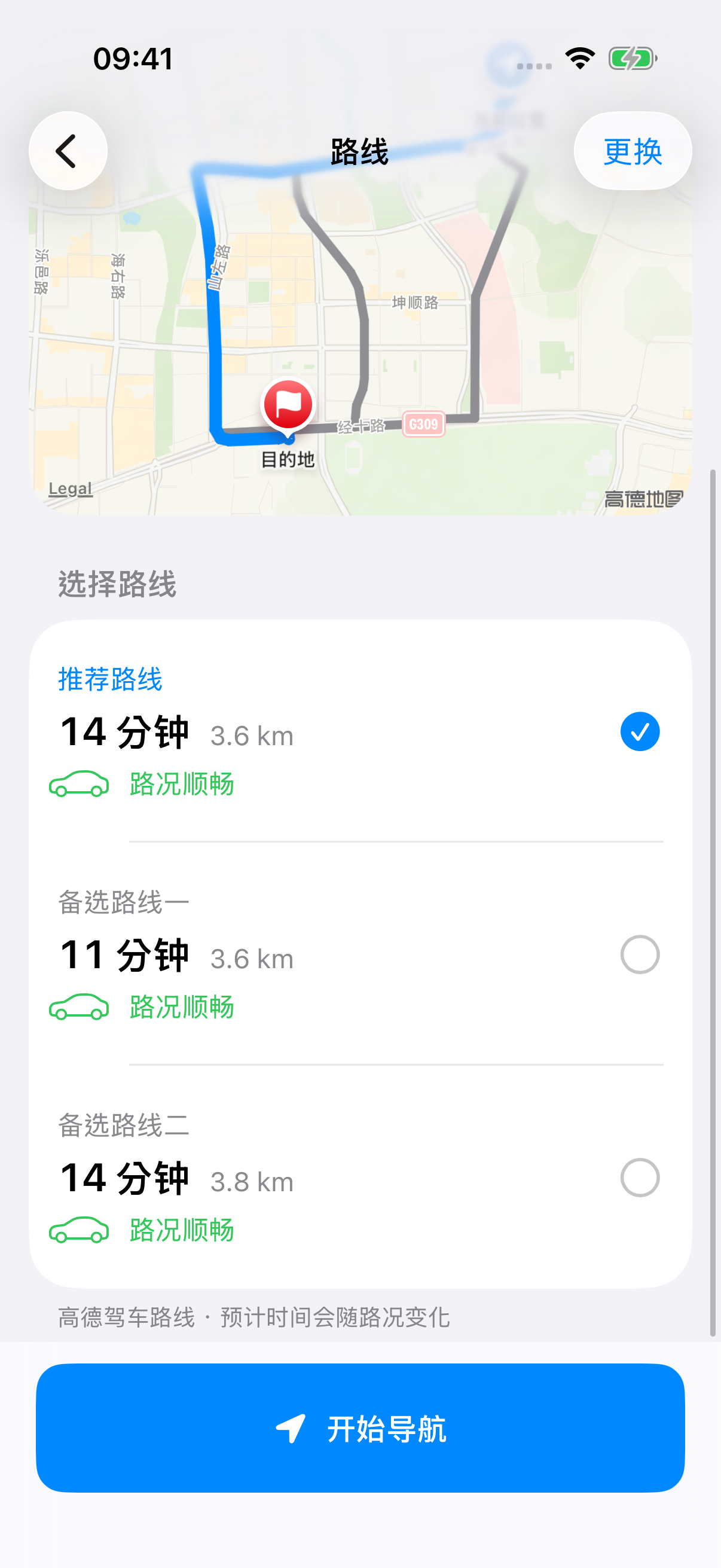
最多对比三条候选路线。设备连接和地图下载也在这里,支持系统深色模式和大字体。Compare up to three candidate routes. Device pairing and map downloads live here too, with support for system dark mode and large type.
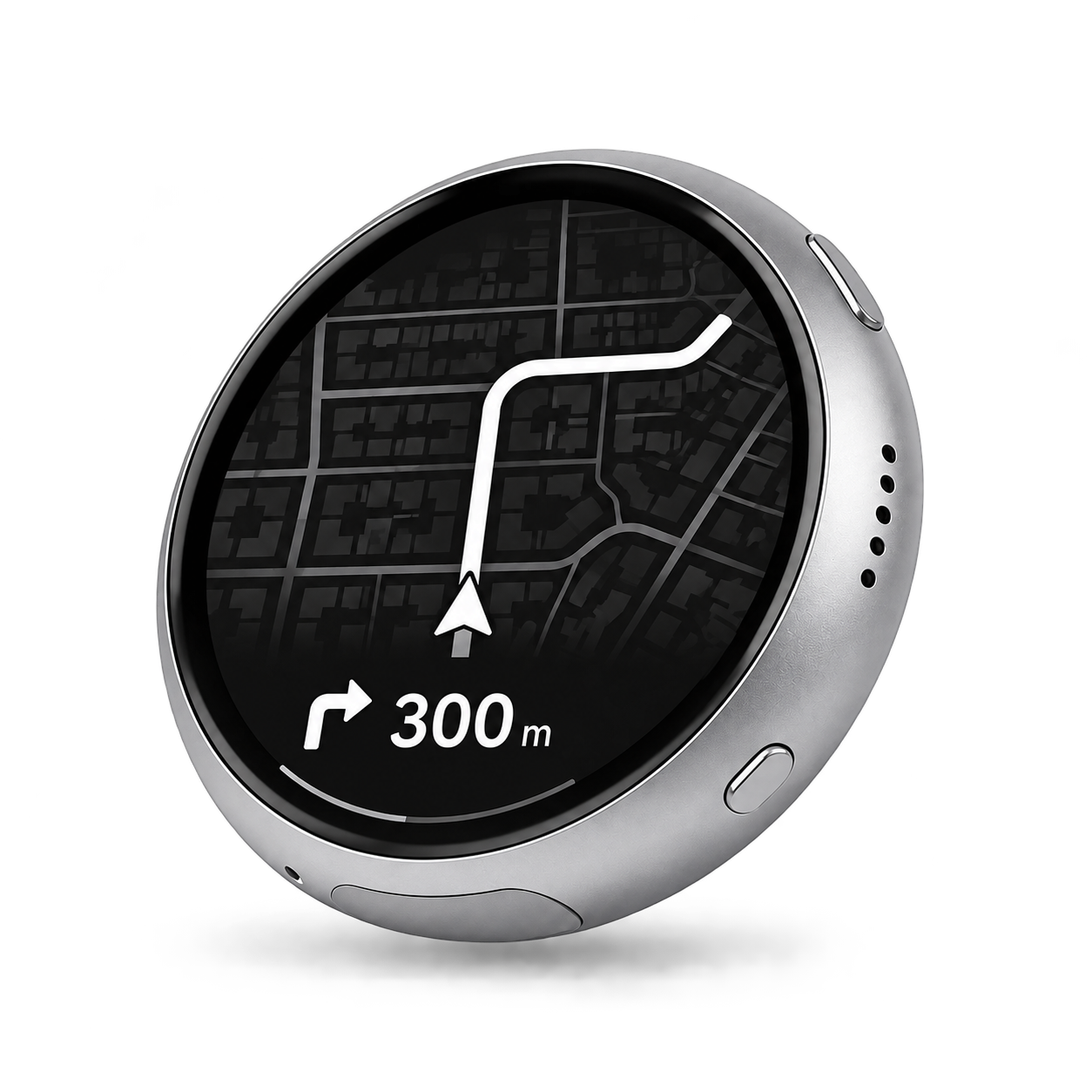
手机 + 微雪圆屏Phone + Waveshare round screen
摩托车上的小圆屏导航。A little round-screen navigator for your motorcycle.
在手机上选好路线,圆屏显示下一次转向、距离和周围道路。手机负责定位和规划,两者通过蓝牙连接。Pick a route on your phone and the round screen shows the next turn, the distance and the roads around you. The phone handles positioning and planning; the two connect over Bluetooth.
项目开发中 · 源码与制作教程已公开In development · Source and build guide are public

支持 Glimpse 开发的 AI 中转The AI gateway that supports Glimpse
满血好模型,价格很能打。Full-strength models at prices that compete.
圆屏与 AppScreen & app
出发前在 App 里搜索目的地,对比路线的时间和距离。开始导航后,转向提示会同步到圆屏。Before you set off, search a destination in the app and compare routes by time and distance. Once navigation starts, the turn cues sync to the round screen.
最多对比三条候选路线。设备连接和地图下载也在这里,支持系统深色模式和大字体。Compare up to three candidate routes. Device pairing and map downloads live here too, with support for system dark mode and large type.
导航、速度、行进航向和 Apple Music。点击下面的选项,看看屏幕里的变化。Navigation, speed, heading and Apple Music. Tap the options below to see the screen change.
使用流程How it works
点击任意一步,查看圆屏对应的画面。Tap any step to see the matching round-screen view.
地图与下载Maps & downloads
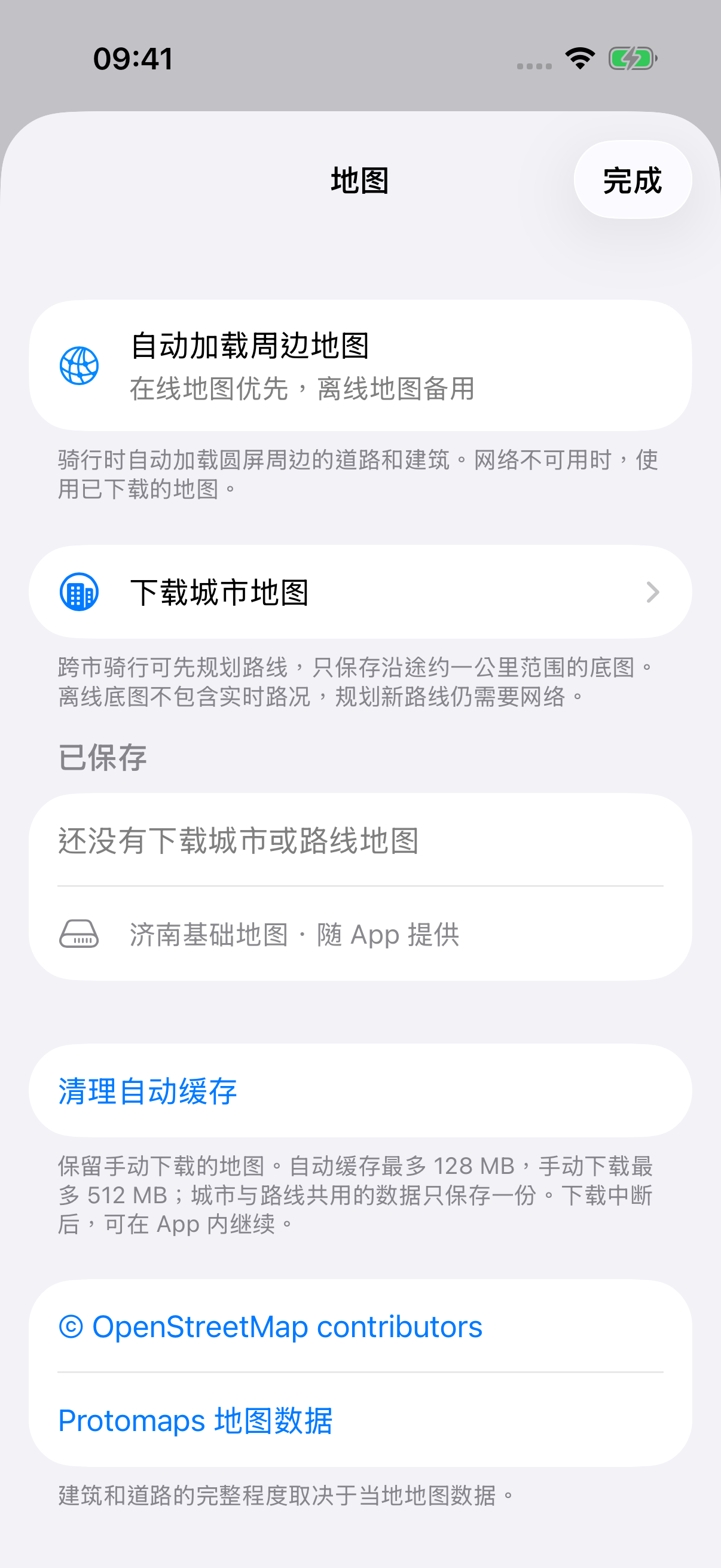
导航时会在线加载附近的道路与建筑。担心途中信号不好,可以提前保存需要的地图。While navigating, nearby roads and buildings load online. Worried about weak signal on the way? Save the maps you need in advance.
随当前位置加载周边底图,加载过的区域会留在缓存中。Loads the base map around your current location; areas you've loaded stay in the cache.
搜索城市或区县,确认范围后下载。常去的地方可以一直留在手机里。Search a city or district, confirm the area, and download. Places you visit often can stay on the phone.
先选路线,再保存沿途约一公里范围的地图。下载可以暂停,也可以继续。Choose a route first, then save the map within about a kilometer of it. Downloads can pause and resume.
离线保存的是道路与建筑底图。地点搜索、新路线规划、偏航重算和实时路况仍需要网络;覆盖完整程度取决于当地地图数据。Offline saves the road and building base map. Place search, new route planning, off-route recalculation and live traffic still need a network; coverage depends on local map data.
自研主板Our own board
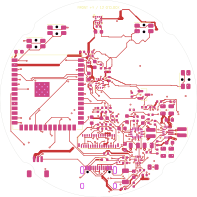
除了微雪版本,我们还设计了 B1 主板。定位和路线仍由手机提供,板上负责蓝牙、圆屏、触摸与电源,保留电池充电和方向传感器接口。Besides the Waveshare build, we designed the B1 board. The phone still provides positioning and routes; the board handles Bluetooth, the screen, touch and power, with headers kept for battery charging and an orientation sensor.
原理图和 PCB 已有工程候选,屏幕接口、电池参数和首板实测还没完成。现在先把微雪版本做好,自研板打样、外壳和安装结构暂缓推进。The schematic and PCB are at the engineering-candidate stage; the screen interface, battery parameters and first-board testing aren't done yet. For now the focus is the Waveshare build, while board fabrication, enclosure and mounting are on hold.
开源 · GitHubOpen source · GitHub
iPhone 和安卓 App、圆屏固件、服务器和 PCB 设计都在同一个仓库里。觉得这个项目有意思,欢迎点一个 Star 支持一下,也欢迎提 Issue 或一起开发。The iPhone and Android apps, the round-screen firmware, the server and the PCB design are all in one repository. If the project interests you, a Star is appreciated — and you're welcome to open an Issue or build along.
mx3353672833-debug / moto-gps-waveshare
Q & A
目前还没有成品出售,也没有可直接安装的公开 App。源码和制作教程已经放在 GitHub,有兴趣可以按教程准备微雪硬件、安装 App 并配置网关,自己做一台。欢迎分享修改和制作经验,也欢迎一起解决遇到的问题。
There's no finished unit for sale yet, and no public app you can install directly. The source and build guide are on GitHub; if you're interested you can follow the guide to prepare the Waveshare hardware, install the app and configure a gateway, and build one yourself. Sharing your changes and build notes — and working through problems together — is very welcome.
不售卖。这个项目参考了国外已有的同类产品,是照着做的学习项目,不好拿来卖。源码和教程都公开,有兴趣可以自己准备硬件做一台。
No. This is a learning project modeled on an existing overseas product of the same kind, so it isn't something to sell. The source and guides are public; if you're interested, prepare the hardware and build one yourself.
不复杂。硬件用的是微雪的成品开发板,买回来不用焊、不用改,烧录固件就能亮屏。稍有门槛的是给手机装 App:目前没有上架版本,需要用 Xcode 把源码编译后装进自己的 iPhone,免费的 Apple 账号就可以,只是签名每 7 天要续一次;安卓手机用 Android Studio 或命令行编译出 APK 安装,没有 7 天限制。硬件清单和每一步的操作都写在 制作教程 里。
Not really. The hardware is a ready-made Waveshare dev board — no soldering or modification; flash the firmware and the screen lights up. The one hurdle is the phone app: there's no App Store build, so you compile the source in Xcode and install it on your own iPhone. A free Apple account works; the signature just needs renewing every 7 days. On Android you build an APK with Android Studio or the command line and install it, with no 7-day limit. The parts list and every step are in the build guide.
可以。GitHub 仓库里有原生 Android App,支持 Android 8.0 及以上,不需要 Google Play 服务。目前需要从源码自行编译安装,真机配对与骑行仍在测试。
Yes. The GitHub repository includes a native Android app for Android 8.0 and later, with no Google Play services required. For now you build and install it from source; pairing and rides on real phones are still being tested.
不需要。手机与圆屏通过蓝牙通信,手机自己用 Wi-Fi 或蜂窝网络获取在线服务。
No. The phone and round screen talk over Bluetooth; the phone uses its own Wi-Fi or cellular for online services.
不需要。周边地图默认在线获取;也可以进入“地图与离线下载”,搜索常用城市或区县并保存。跨市时先规划路线,再下载“这条路线周边”。范围太大时可选择较小区县。道路和建筑覆盖取决于当地数据。
No. The surrounding map loads online by default; you can also open “Maps & offline downloads,” search a city or district and save it. For trips between cities, plan the route first, then download “around this route.” If the area is too large, choose a smaller district. Road and building coverage depends on local data.
下载包保存的是周边道路和建筑,方便断网时显示已有底图。地点搜索、规划新路线、偏航重算及实时路况仍需要网络。它目前不是完整的离线路线引擎。
A download holds the surrounding roads and buildings, so the base map still shows when you're offline. Place search, planning new routes, off-route recalculation and live traffic still need a network. It isn't a full offline routing engine yet.
回到地图页面,在未完成的下载包上选择继续,已有有效内容会复用。可以删除下载包或清理自动缓存。自动缓存和手动下载均有容量限制;多个区域共用的地图只保存一份。
Go back to the map page and choose resume on the unfinished download; valid content already fetched is reused. You can delete a download or clear the automatic cache. Both the auto cache and manual downloads have size limits, and a map shared by several areas is stored only once.
不能保证。当前使用高德普通驾车路线,不能保证覆盖各地的摩托车禁限行规则。选择路线时需要结合当地规定与道路标志判断。
No guarantee. It currently uses AMap's ordinary driving routes, which don't necessarily reflect local motorcycle restrictions. Judge each route against local rules and road signs.
原生 App 使用后台定位和蓝牙支持已开始的导航;需要相应系统权限,长时间与复杂场景仍在验证。连接异常时,检查圆屏固件、电源与蓝牙权限,靠近手机并仅开启一台测试圆屏,再在设备页尝试重新连接。
The native app uses background location and Bluetooth to keep an already-started navigation going; it needs the matching system permissions, and long sessions and edge cases are still being validated. If connection fails, check the screen's firmware, power and Bluetooth permission, move close to the phone with only one test screen on, and try reconnecting from the device page.
支持 iPhone 和安卓手机。iPhone 上的音乐控制针对系统 Apple Music;安卓上可控制网易云音乐、QQ 音乐等提供系统媒体会话的播放器,需开启通知使用权。两者都支持上一首、播放/暂停和下一首。指南针当前以行进航向为主,停车绝对北向仍需后续传感器与标定验证。
iPhone and Android phones. On iPhone, music control targets the system Apple Music; on Android it works with players that publish a system media session, such as NetEase Cloud Music and QQ Music, once notification access is granted. Both support previous, play/pause and next. The compass is currently based on heading of travel; an absolute north reading while parked still needs a later sensor and calibration.
联网搜索和路线请求会经项目服务交给高德;请求地图也会透露查看区域。服务器访问日志可能记录 IP、搜索词和位置参数。最近地点、配对记录和地图下载保存在手机;音乐信息通过蓝牙发往圆屏。App 的“隐私与数据”说明了这些用途与清理方式。
Online searches and route requests go through the project service to AMap; requesting map tiles also reveals the area you're viewing. Server access logs may record IP, search terms and location parameters. Recent places, pairing records and map downloads stay on the phone; music info is sent to the round screen over Bluetooth. The app's “Privacy & data” page explains these uses and how to clear them.
没有找到匹配的问题。换个关键词试试,或者在下面留言。No matching questions. Try another keyword, or leave a message below.
来信 · IssuesEmail · Issues
整理自官网来信和 GitHub Issues,记录项目的使用方式、功能边界,以及由反馈带来的改进。Selected questions from website emails and GitHub Issues, covering how the project works, its current limits, and improvements prompted by feedback.
问题和回答经匿名化、节选与整理;部分条目补充了已发布的项目资料。Questions and answers have been anonymized and edited for clarity. Some entries include updates from published project documentation.
可以参与,但要区分圆屏固件和手机 App。Windows 可以修改、烧录圆屏固件;自行编译 iPhone App 需要 Mac 和 Xcode,没有 Mac 的安装方式见 IPA 测试包说明。安卓 App 在 Windows、macOS 和 Linux 上都能编译。
There are separate workflows for the display firmware and the phone app. Windows can be used to modify and flash the display firmware. Building the iPhone app from source requires a Mac and Xcode. If you do not have a Mac, see the IPA preview installation guide. The Android app can be built on Windows, macOS or Linux.
GitHub 讨论GitHub discussion ↗Android AppAndroid app ↗IPA 安装说明IPA installation guide ↗
已发布 v0.3.1 未签名 IPA 测试包,需要用自己的 Apple 账号重新签名,不能直接点开安装。仓库提供 SideStore 安装说明,要求 iOS 17 或更新版本,并需配置自己的 HTTPS 导航网关。发布说明尚未确认 SideStore/LiveContainer 真机安装、蓝牙及锁屏后台导航表现,LiveContainer 兼容性也未确认。
An unsigned v0.3.1 IPA preview is available. It must be re-signed with your own Apple account before installation. The repository includes SideStore instructions for iOS 17 or later, and you need to configure your own HTTPS navigation gateway. The release notes do not confirm physical-device installation through SideStore or LiveContainer, Bluetooth operation, or navigation while the phone is locked. LiveContainer compatibility remains unconfirmed.
下载测试包Download preview ↗安装与配置Installation and setup ↗原始提问Original discussion ↗
目前没有苹果付费开发者账号,暂时无法提供 Ad Hoc 签名服务,付费也不能办理。有 Mac 可以从源码编译安装;仓库另有未签名 IPA 测试包供自行重新签名使用,这与作者提供 Ad Hoc 签名服务不同。
I do not currently have a paid Apple developer account, so I cannot provide Ad Hoc signing, including as a paid service. You can build from source using a Mac. The repository also provides an unsigned IPA preview for user-side re-signing; that is separate from an author-provided Ad Hoc signing service.
目前没有做 CarPlay 适配。现有方式是由 iPhone 上的配套 App 通过蓝牙把导航信息发送给圆屏,圆屏暂时不能当作 CarPlay 屏幕使用。
CarPlay support has not been implemented. The companion iPhone app sends navigation information to the round display over Bluetooth. The display cannot currently function as a CarPlay screen.
CarPlay 与圆屏同时使用的组合还没有实测,暂时不能保证。目前也没有接通可用的真实道路限速数据,因此无法满足这项限速提醒需求。界面可以通过修改源码调整;如果主要为了这个功能,建议先不要购买硬件。
I have not tested simultaneous use with CarPlay, so I cannot confirm that setup. A usable source of real road speed-limit data is not connected yet, so the requested warning feature is unavailable. The interface can be changed in the source code. If this is your main reason for building the device, I suggest waiting before buying hardware.
可以,已在邮件中同意这次发布请求。
Yes. I approved this publishing request by email.
已加入 Workers + R2 部署方案,原有 Node.js 方案也继续保留。R2 用于地图缓存,高德 Key 配置在 Worker Secret 中;仍需自己的 Cloudflare 账号和高德服务权限。国内网络表现需要在实际使用地区测试,Issue 中他人 OTA 服务的下载速度不代表本项目的导航表现。
A Workers + R2 deployment option has been added alongside the existing Node.js option. R2 stores map cache data, and the AMap key is configured as a Worker Secret. You still need your own Cloudflare account and AMap service access. Test connectivity in the region where you will use it; another contributor's OTA download speed does not establish this project's navigation performance.
直接留言Leave a message
使用中遇到的问题、改进建议,或者你自己做的版本,都可以聊。留言会通过邮件发给项目作者;想收到回复的话,记得留下邮箱。Problems you've run into, suggestions, or your own build — all fair game. Messages are emailed to the author; leave your email if you'd like a reply.